





Stay Powered. Be Supported. Get Ahead.
Server Technology’s power strategy experts have provided power solutions for labs, data centers, and telecommunications operations for 30 years. Over 60,000 customers around the world rely on their rack power distribution units and award winning power management solutions to reduce downtime, facilitate capacity planning, improve energy utilization, and drive efficiency. With the best quality, best technical support and most patents, Server Technology products provide uncompromising reliability, innovation, and value for the data center.
Founded in 1984, ServerTech, Inc. is a pioneer and leader in Remote Power Management technology, manufacturing a line of remotely addressable power switches called Sentry Remote Power Managers. Available for both AC and DC power supply, Sentry products enable remote power control (off, on, reboot, graceful shutdown) of servers and internet working devices in remote equipment rooms, POP sites, Telco central offices and other co-location facilities.
Sentry products are used in data centers, network rooms, switching offices, wiring closets and remote offices locations and are for a variety of applications, including sever management, data center management, backbone equipment and Customer Premise Equipment.

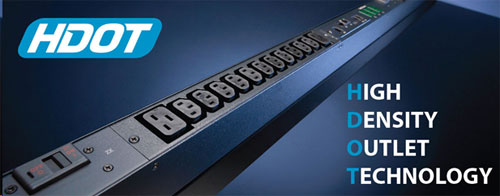
Custom Rack Power Distribution Units
Build Your Own Rack PDU with HDOT Technology. Ask us how!

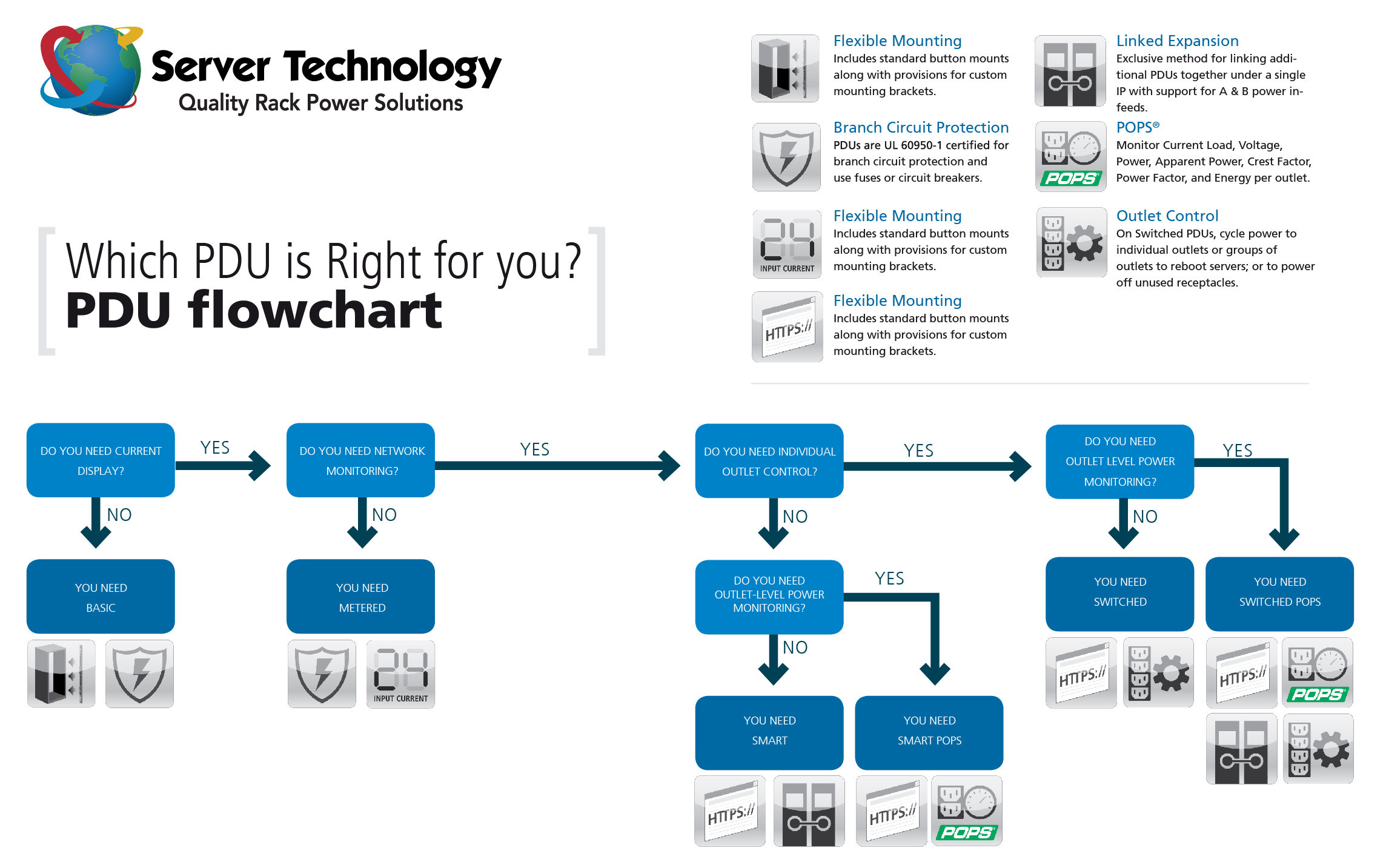
Basic Cabinet Power Distribution Units
Cabinet Power Distribution with Branch Circuit Protection. Sentry Basic CDU products provide reliable power distribution for all the devices in the equipment cabinet, from 2kW-6kW per cabinet. Available in single-phase 110-120V or 208-240V power distribution with 20A or 30A options and 3-phase 208-240V power distribution with 20A, 30A, 50A or 60A options.

Metered Cabinet Power Distribution Units
Cabinet Power Distribution with Branch Circuit Protection, and Local Input Current Monitoring.
Sentry Metered CDU products provide reliable power distribution, from 2kW-22kW per cabinet. Available in single-phase 110-120V or 208-240V or 3-Phase 208-240V power distribution with 20A, 30A, 50A or 60A options. Local input current monitoring allows the installation engineer to verify the aggregate load on the circuit or phase.

Smart Cabinet Power Distribution Units
Cabinet Power Distribution with Branch Circuit Protection, expanded functionality of SNMP-based Input Current Monitoring and Environmental Monitoring.
Smart CDU products provide reliable power distribution coupled with remote power & environmental monitoring. Use the network interface to view power, temperature and humidity levels via Web browser, or SNMP-based and email alerts when conditions exceed defined thresholds.

Switched Cabinet Power Distribution Units
Receive SNMP-based or email alerts when power or environmental conditions exceed thresholds. Assign access rights to user groups or individuals. Switched CDU products provide the flexibility needed for all data centers and remote sites, including power requirements for high-amperage and high-voltage, UL 60950-1 Branch Circuit Protection, and SNMP traps and email alerts including current monitoring.

The New PRO2 Switched Power Distribution Units
The PRO2 has a flexible firmware platform that can expand upon and meet future needs of customers. It has a new faster hardware platform with additional memory and offers a complete solution for uptime and availability including features like a hot swappable network card that can be replaced under power. The PRO2 is ideal for those who will be utilizing the PDU in particularly high-density, high temperature, and high-security applications.

Smart & Switched CDU® with PIPS™
Per Inlet Power Sensing (PIPS) is available on select Smart and Switched CDUs. Monitor Current Load (A), Voltage (V), Power (W), Apparent Power (VA),Crest Factor, Reactance, Accumulated Energy (kWh), and Power Factor per inlet.

Smart & Switched CDU® with POPS™
Per Outlet Power Sensing (POPS) is available on select Smart and Switched CDUs. Monitor Current Load (A), Voltage (V), Power (W), Apparent Power (VA), Crest Factor and Power Factor per outlet.

-48VDC Cabinet Power Distribution Units
DC Cabinet Power Distribution with remote monitoring & management, including remote reboot to connected servers and network equipment. Each power output terminal is protected by a GMT fuse, TPC fuse or circuit breaker, available in a wide range of capacities. NEBS (Network Equipment-Building System) Compliant.

Server Technology Bluetooth App (ST Eye)
Remote Power and Environmental Monitoring of STI CDUs from your Android or Apple device. This App is designed to allow easy access of power, system and environmental information from Server Tech Cabinet Power Distribution Units. No need to connect a computer or physically connect to get information from the PDU when installed in the back of a cabinet. Use of this App requires an external Bluetooth module, version 7.0j firmware on the CDU and the proper auxiliary port.

Fail-Safe Transfer Switch
Power Distribution with the expanded functionality of dual A & B input power feeds to supply redundant fail-safe power should an in-feed fail.

Sentry Power Manager (SPM):
Rack-level data center power monitoring and management
The Sentry Power Manager appliance and software package is capable of monitoring and managing multiple Sentry devices in IP-based enterprise networks.
SPM provides a global view of all Sentry CDUs with the ability to view devices based on their temperature, humidity, current and device status.
Tools & Features
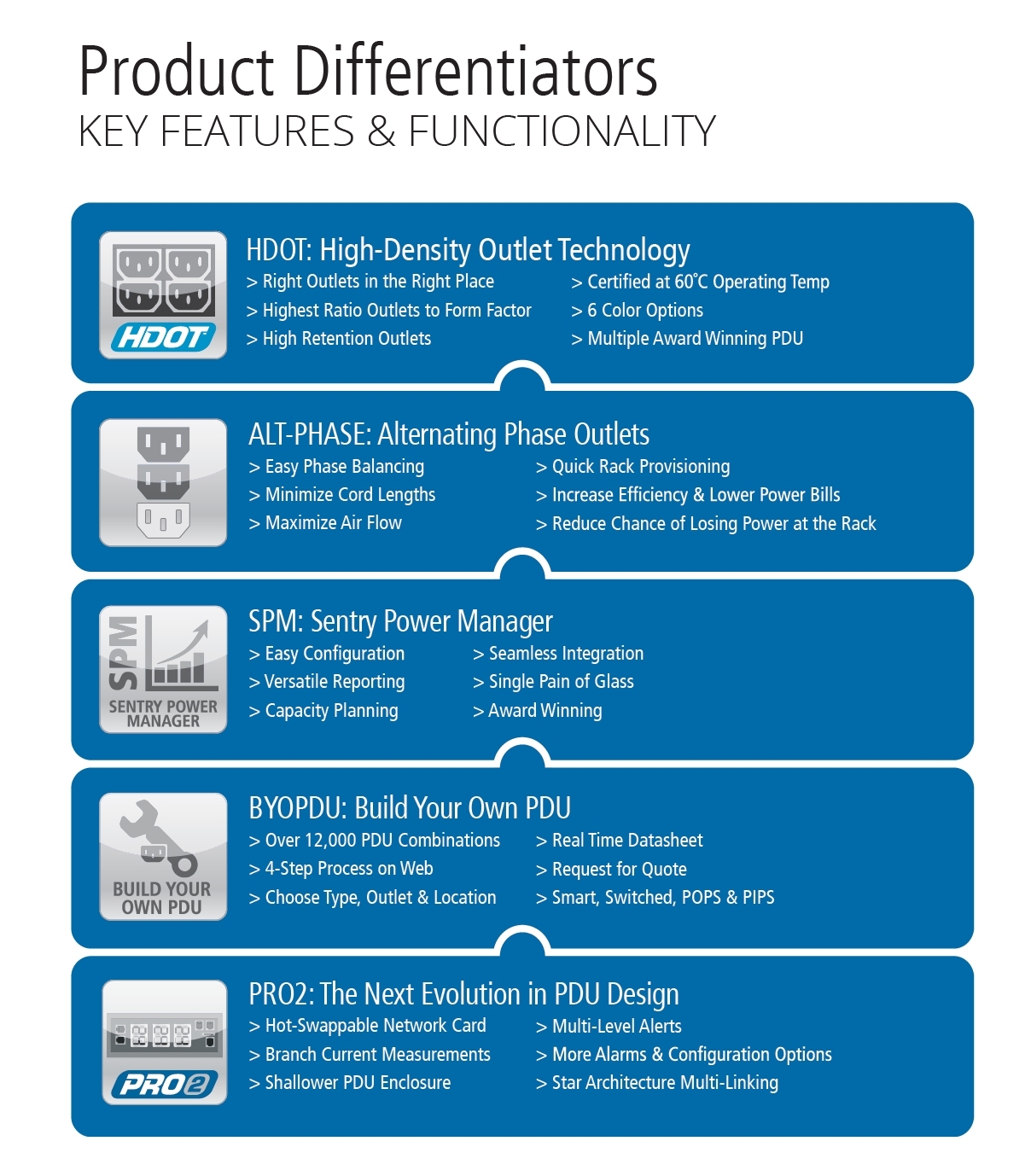
High Density Outlet Technology (HDOT) : Your Density Solution
Short on real estate, high on rack components? Choose High Density Outlet Technology. HDOT has the most outlets in a 42U intelligent Rack PDU with industry standard C13 and C19 outlets. Comes with high native cord retention and color-coded alternating-phase outputs for easy cabling and operation to 65C (149F) ambient.
Alternating Phase Technology : Your Load Balancing Solution
Choose Alternating Phase. Alternating phase outlets alternate the phased power on a per-outlet basis instead of a per-branch basis. This allows for shorter cords, quicker installation and easier load balancing for 3-phase rackmount PDUs. Shorter cords mean less mass, making them less likely to come unplugged during transport of the assembled rack.
PRO2™ PDU : Your Uptime Solution
The next evolution in PDU design; with a shallower form-factor, faster processing, and more memory. Your Uptime solution.
Sentry Power Manager (SPM) : Your Capacity Solution
Award winning, most comprehensive and affordable rack-level solution for measurement and reporting. Your Capacity Planning solution.
Build Your Own PDU with the Online Configuration Tool : You Want IT, You Got IT
Server Technology’s Build Your own PDU online configuration tool takes a Smart or Metered 42-outlet High Density Outlet Technology (HDOT) PDU chassis and allows you to build an HDOT PDU your way in four simple steps. To create a custom PDU visit www.servertech.com/byopdu. Once your submission is complete, you will receive a follow-up to your request for quote within 24-hours or less
55,000+ Client Companies Have Chosen 42U
There’s a reason we’re the #1 choice of so many IT professionals.
Contact us and experience why.

Questions? Call us.
Call in and speak with one of our knowledgeable solutions engineers who will answer any questions you might have.
1-800-638-2638

Explore 42U Solutions
One of our data center solutions specialists will work together with you to find the optimal solution for your system.