Dataprobe iBoot Remote Reboot

Dataprobe iBoot Web Enabled Power Cycle


Green Data Center
Green Data Center

42U Partial Client List
15-Years of Customer Astonishment!

Energy Efficiency Calculator
Efficiency Calculator
Free Project Consultation
 

Dataprobe iBoot

Dataprobe iBoot Single Outlet Remote Reboot Solutions

Dataprobe iBoot Remote Reboot

Dataprobe iBoot
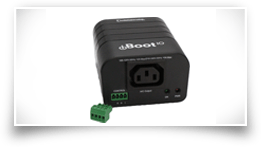
Dataprobe iBoot is a network attached, IP addressed, Web Controlled AC power switch. Anyone with a web browser can access iBoot to perform power On, Off or Reboot (timed power shutdown). iBoot is password protected for security. iBoot uses international standard IEC320 Connections and is selectable for 115VAC or 230VAC. iBoot handles circuits up to 8 Amps (6 Amps at 230VAC).

KVM Switch online sales Buy Online

Use Dataprobe iBoot to:
  • Remote reboot of any device, routers, servers, kiosks, etc. The device to be rebooted need not be network attached.
  • Secure sensitive devices by keeping them powered off when not in use. This prevents hackers from seeing them at all times.
  • Power down equipment when not needed for power savings and to save on wear and tear.
  • Power up alert devices like sirens, lamps, messages; or control environmental system like heaters, coolers, pumps, etc.
  • Routers
  • Kiosks
  • Servers
  • Cell Sites
  • Anything
  • ATM Machines
  • HVAC
  • Generators
  • Alert Systems
  • Anywhere

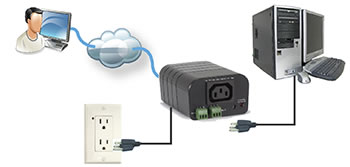
Dataprobe iBoot Remote Reboot Diagram

   
Dataprobe iBoot Remote Reboot Screen Shot
Dataprobe iBoot Remote Power Controller
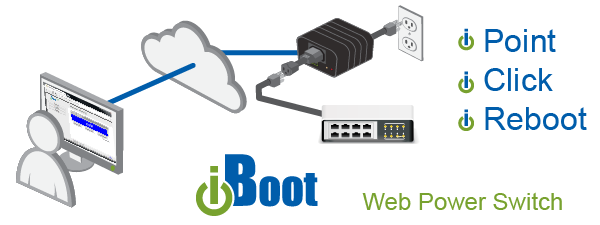
Just point your browser to iBoot's IP address, enter the Password and you're one click away from power ON, OFF or a timed Reboot.  It's that simple.

The unique Auto-Ping feature allows iBoot to monitor any IP device on the network and take automatic action whenever the device is down.  

   
iBoot Features Dataprobe iBoot Benefitsb>
Access from any Network point No field trips required for Reboot. Save time and money by eliminating service calls and reducing downtime to a minimum.
Web Control No special software required. Works with any forms capable browser. Easy Web Administration for all configuration.
Dual Password Protected Separate user and administrator passwords. Deploy iBoots throughout your organization.
IP Addressed, 10/100Base-T Use on any Ethernet IP network. Public or private. Supports DHCP and alternate ports for Web Access
Automatic Reboot Operation Auto-Ping and Heartbeat Detector. Automatic Operation for crashed devices. Auto-Ping pings device while heartbeat listens for periodic message. Complete control over frequency and timers. Developer Assistance and software tools are free.
Direct TCP and Software Control Control iBoot directly from your software application for the highest degree of power control integration. Simple protocol is freely available. Use iBoot control program to call power control from any network management system. IPSentry What'sUp Gold, etc.
Built in Hub Reduce cabling and simplify installation. One cable from you network closet serves both the iBoot and server, kiosk, etc. Auto-sensing for uplink/downlink eliminates the need for expensive crossover cables.
110/220 VAC Operation Auto ranging power input. Deploy iBoot anywhere in the world. iBoot uses IEC320 Connectors and includes line and extension cords for North America.
12 Amp Switching Current for most Servers, Routers, Kiosks, etc. 10 Amps at 220 VAC

Dataprobe iBoot Version 1.1 New Features Include:

Alternate Ports Ports besides the standard HTTP port 80 can be used. This allows iBoot to be used behind firewalls that block port 80, and allows multiple iBoots to be used behind NAT routers
Dual Passwords There are now two passwords. One is for normal access and operation of iBoot, the other adds access to the Setup functions. You can now deploy iBoot to your users without worry about them changing any settings.
Factory Defaults In the event that the password is forgotten, or IP address has been programmed to an invalid number, there is now a Windows program that can reset iBoot back to its original factory defaults and/or set its IP address.

Dataprobe iBoot Additional Features Available:

Direct TCP Control Integrate iBoot into your software or network management system. Direct TCP control allows you to command iBoot without having to go through the web browser.
DHCP Support Obtain IP address from any DHCP server. Minimizes iBoot configuration time.
Dataprobe iBoot Version 2.0 Now Released New Features Include:
Auto Ranging Power Supply Auto sensing power supply removes 115/230VAC switch. Just plug it in!
Improved 10/100 Hubbing New 10/100 hub auto detects uplink/downlink. Plus better 100base-T throughput on busy networks.
Heartbeat Detector Auto-Ping in reverse. Send a periodic TCP message to iBoot from your server, kiosk or other device. When the heartbeat fails, iBoot will automatically reboot the system. Free software tools and developer assistance.
iBoot Control Center Software Control an unlimited number of iBoots from one software application. Group iBoots for simultaneous actions. Schedule time of day activities like reboot or shutdown every night.
<tr> <td><b>FAQ</b></td> <td>Additional information and trouble shooting guide</td> <td>Available Soon</td> </tr>
    iBoot Tools
Operations Manuals Installation and Operations Instructions Download Ver 1.5
Download Ver 2.0
Catalog Sheet Two page sales brochure on iBoot Download Now
Reset and IP Address Utility Set IP address, Reset lost passwords and factory defaults Download Now
TCP/IP Control Protocol Operate iBoot directly via UDP Messages.
Integrate iBoot into your network management software or script
Download Now
iBoot Control Program Windows Utility to Operate iBoot Download Now
iBoot Control Center Windows Program to operate multiple iBoots.
Group and Time of Day functions
Beta Release Only
Download Now
The following are for Version 2.0 and above
Heartbeat Protocol Integrate iBoot's Heartbeat Detector into your software Download Now
Heartbeat Generator Windows Program to send Heartbeats Download Now
Heartbeat .DLL Software tool to call Heartbeat from your program Download Now
Dataprobe iBoot Specifications
Power 105-240 VAC Auto Ranging
Connectors: Power Input IEC 320 Plug.  Linecord for North America Included

        Power Out 

IEC 320 Receptacle. Extension Cord for N.America Included
Switching:  Up to 12 Amps at 105-125 VAC, 10 Amps at  210-240 VAC
Communication Dual 10/100base-T, Built in Hub
  Cat5 Cable Provided
Protocols IP Addressable.  HTTP Web Server built-in
  TCP Messaging Protocol 
Auto-Ping TCP Protocol
Heartbeat Detector Protocol
Browser Requirements
Form Processing Browser Required
Netscape 3.0 or IE 3.0 or greater
Security Dual Password Protected
Physical Height 2.25 in.Width 4.50 in. Depth 6.00 in.Weight 1.25 lb.
 
 
 Home About 42U Careers Clients Vendors Press Articles Efficiency Glossary Site Map Efficiency Calculator
Data Center Solutions UPS Power Data Center Efficiency Efficiency Services Rack Accessories Efficiency Best Practices Lights Out
Follow us on:
 Follow 42u on Twitter Subscribe to 42U's channel on YouTube View 42u's profile on slideshare


Dataprobe iBoot
Dataprobe iBoot Remote Reboot