



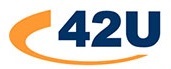
What is KVM Over IP?
KVM over IP solutions (also known as IP KVM switches or digital KVMs) provide secure bios level access and control of servers and network devices utilizing a browser via the network. KVM over IP solutions can be used to enhance or to replace in-band solutions such as RDP, VNC, SSH or other out-of-band access solutions such as remote access cards for a reliable and secure way to manage an IT infrastructure.
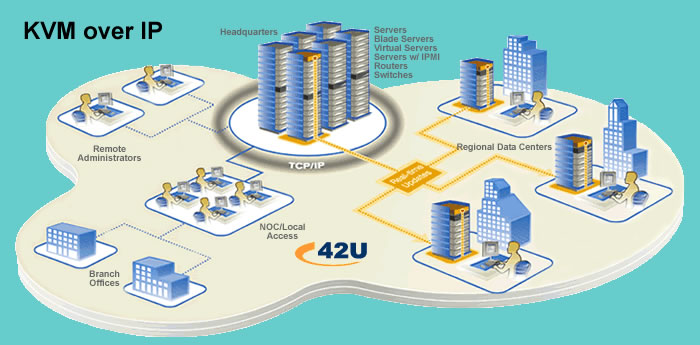
What is Virtual Media?
Virtual Media for KVM switches allows for the mounting of storage devices, disks and ISO images over the network. Virtual media functions as if the remote media was directly attached to the server, allowing the target computer to be booted to any number of virtual drives.
Once attached, virtual media allows the remote administration of a number of tasks: from installing applications, patches, and complete operating installs to virus scanning and diagnostics. Additionally, these tasks can be performed simultaneously on all servers attached to the KVM switch without a physical presence in the server room.
- Scalable for small to large data centers
- Manage branch offices, IDF closets, kiosks and more remotely
- Limit physical access to the data center
- Integrate power strips to reboot systems that have crashed
- Smart Card/CAC support
- Virtual Media (file transfer) support
- ILO, DRAC and other service processor support
Another type of IP KVM product is known as Desktop over IP. Desktop over IP is similar to a KVM extender solution, but leverages network protocols to provide a true desktop experience in a point-to-point configuration or routed via the network. This type of solution is very popular in the broadcast market, clean rooms, secure computing environments and many other solutions that require high resolutions, USB peripheral flexibility and environments that you cannot simply run a Cat5 or fiber cable and must leverage network connectivity.
Utilizing advanced security and regardless of operating system, these Remote Access KVM Over IP products allow you to remotely control all your servers/CPUs including pre-boot functions such as editing CMOS settings and power cycling your servers. All of these Remote Access KVM Over IP products allow you access via your internal LAN/WAN, and some allow connectivity via the Internet or dial-in access via ISDN or standard 56K modems.
Comparison of VNC, RDP, and other Remote Access software with KVM over IP
As many IT departments are operating at downsized levels and employees are being asked to manage more mission-critical server room equipment with fewer resources, the ability to remotely monitor and maintain performance of server equipment has become essential.
Administrators primarily use two remote management approaches for controlling computers by leveraging the IP network. The first approach is hardware based, which utilizes network-enabled KVM switches to provide out-of-band BIOS-level access. The second approach is through the use of remote access software. Depending on the data center environment and application, these approaches can be used separately or in combination and allow network administrators to remotely view target systems as though they were sitting directly in front of them.
Remote Access Software
Remote access software programs are loaded onto the target computer or, in some cases both target and remote computers, and allow users to view and take remote KVM control and access servers from any location with internet access.
Remote management software includes Virtual Network Computing (VNC), PCanywhere, and Remote Desktop Protocol (RDP). Older versions of PCanywhere could only be used on Windows-based computer systems. More recent versions can be used with Windows, Linux, and Mac OS operating systems. Using a platform-independent software approach, VNC requires users to load software on both client and server computers. RDP is built into Windows products.
Although most remote access software is simple to load and can in some instances be obtained for free, users must install the remote management software on every machine in the data center that needs remote connectivity. This approach increases the number of touches needed to a server by an administrator and also introduces the need to test any new software programs with the control software.
The other drawback to remote access software is that the remote operating system must be up and running at the application level for the remote session to work properly. If the operating system crashes on the remote computer during remote connectivity at any time, users will be forced to take alternative ways to activate the remote computer. In most cases, this will result in the need to physically reboot the remote server from a cold start.
Digital KVM Remote Server Management
KVM over IP is a general industry term used to describe a hardware-based approach that allows administrators to gain true keyboard and mouse control of servers remotely. KVM over IP applications generally fall into two broad categories: pure digital applications and front-end IP products.
- Digital IP KVM Switches: A pure digital implementation uses digital KVM switches and is a network-based management approach that allows administrators to gain BIOS-level access of the attached servers by communicating with the networked digital KVM switch.
- Front-End IP Products: Remote access can also be implemented using front-end IP products (IP Gateways), which are positioned at the console of existing analog switches and permit remote users to gain secure access to an existing KVM switch.
In both cases, an administrator uses a standard internet browser session to remotely access the KVM switch and attached servers. Administrators can gain access with most major Web browsers, including Internet Explorer, Mozilla Firefox, and Safari. In addition, these hardware based remote server management products can be seamlessly integrated with remote management software, such as Avocent’s DSView, which allows administrators to manage data center appliances from any location, worldwide.
Remote Access Comparison Chart
| Key Remote Access Features & Benefits Remote Access Hardware Remote Access Software | Remote Access Hardware | Remote Access Software |
|---|---|---|
| Remotely access servers |  |
|
| Warm reboot ability | |
|
| Cold reboot ability | * |
 |
| Bios-level access to servers | |
|
| Multiple users can share a concurrent session | |
|
| Encryption of data streaming over the internet | |
|
| User profiles – the ability to add user rights at the port level | |
|
| Employs third-party authentication | |
|
| Exit macros to log out each user when a remote session window is closed | |
|
| Simultaneous flash upgrades | |
|
| Selectable encryption modes to support specific security policies | |
|
| Username and password protection | |
|
| Performs operating system patches | |
** |
| Authenticates users from existing accounts by integrating with industry-standards such as RADIUS and Active Directory | |
*** |
| Provides control of power at the outlet level | |
|
| Provides the ability to boot servers from a remote media source | |
|
| Provides comprehensive logging of user access, system changes, etc. | |
|
| Provides out-of-band access for redundancy | |
|
* Some KVM-over-IP data center management products including Avocent’s DSView and Raritan’s CommandCenter offer the ability to manage integrated remote power PDU’s.
** Some remote software tools do not provide the ability to send software patches.
*** Some remote software solutions only authorize against windows active directory.
Considerations When Evaluating KVM Over IP Switches
As you decide on which IP KVM switch is right for you, consider the following:
- What expansion options (for both users/administrators and servers) does the digital KVM switching solution offer?
- Is the switch cascadable?
- Can you add more concurrent users as needed?
- What are the KVM switch’s cable length limitations?
- Will the local console be within reach of the switch?
- How much additional cabling is required?
- Some switches include KVM cables and or dongles while others require a separate cable purchase, greatly increasing the total cost of ownership.
- What type of cable media does the KVM switch require – coax cable, single, dual CAT5/CAT6, or fiber optic?
- Some use more than one, for example CAT5 and coax – an important topology consideration when considering cost and ease of installation.
- What are the switch’s multi-platform capabilities; and for non-PC environments does the KVM do keyboard mapping or allow you to use your native keyboard?
- Does the KVM switch’s level of security suit your needs?
- While all IP KVMs will offer some level of security, some applications (financial, military, healthcare, government, etc.) require high levels of security that only select models can accommodate.
- What redundancy does the KVM offer if one of its components were to fail?
- How would a failure of any of the KVM switches / components affect your servers and your ability to control them?
- Do you need dual power?
- Dual NICs?
- Does the switch have KVM extension and how is it handled?
- Over CAT5? Fiber?
- Via IP only?
- Does the KVM offer IP and in-band options?
- What are the KVM switch’s power cycling options?
- Can it control intelligent PDUs?
- Only specific manufactures PDUs or multi vendor capable?
- What KVM management solutions are available?
- Does the manufacturer provide a single pane-of-glass management suite for large enterprise applications?
- Are you space-constrained in your current environment?
Read about the Difference Between a KVM Extender & KVM Over IP