




“Green Data Center vs. Data Center Efficiency” – beware of Greenwashing
…many efficiency best practices require minimal costs and don’t require expensive purchases to help Data Centers reduce CO2 emissions and lower their energy costs
Rapidly rising energy costs have had a major impact on what we pay to drive our cars, heat our homes, and feed our families. And yes, data center operational costs have also been heavily impacted by the rising costs of energy. Especially the cost of energy needed to power and cool our facilities, computer rooms and data centers. In the past year, we have all heard more than our fair share of manufacturers professing their products to be “Green”, but few have demonstrated objective life-cycle costs and ROI (Return on Investment) data supporting their energy efficient offering. Even with a lack of solid product data, the good news is that going green in the data center does indeed have a measurable ROI, can significantly reduce your organization’s energy costs, and can be achieved with a minimal amount of upfront costs.
Scot Heath, 42U’s CTO compares the benefits of different containment approaches, discusses the do’s and don’ts, and helps you determine which is the best for your needs. This Webinar covers the following hot aisle / cold aisle containment topics:
- Containment Basics
- Hot Aisle vs. Cold Aisle Containment
- Airflow Strategies
- Half Truths and Pitfalls
Watch the Webinar at:
https://www.42u.com/webinars/hot-aisle-vs-cold-aisle-containment.htm
The Green IT Bandwagon
In August of 2007, the Environmental Protection Agency published a report to congress on “Server and Data Center Energy Efficiency”. This report detailed the rapidly growing energy costs of data centers ($4.5 billion in 2006, $7.4 billion projected by 2011) and the dramatic increase in data center power consumption (61 billion kWh in 2006, 100 billion projected by 2011). The EPA report also explored implementing a new ENERGY STAR benchmark for data centers. Since the report’s publication, most major IT manufacturers announced “Green” products and initiatives. The EPA deserves kudos in trying to improve energy efficiency in data centers, but with so many competing manufactures now claiming to have energy efficient products, the prudent approach is to compare competing technologies and evaluate the energy consumption and life-cycle costs of all your new IT acquisitions. Even more important to your data center strategy is first gaining a solid holistic understanding of your data center environment and critical risk factors prior to investing in any new technologies.
The IT Manufacturer Selection Dilemma
Though there are lots of extremely talented and ethical people working for the IT manufacturers whose products fill your computer room or data center, the obvious reality is that their job security depends on their ability to convince you of their products’ superiority. During the 20+ years since I started my IT career as a Systems Engineer with one of the largest global manufacturers of computers and technology products, I have never heard any manufacturer’s representative sincerely recommend going with a superior competing product or solution. Also important to keep in mind is the exponential improvements in technologies we have all seen and how often we have seen competing vendor technologies leapfrog another. Even if a manufacturer could maintain their superior technical edge in one product area, their diversification efforts into other technology areas has seldom achieved the same accolades. The hot sales buzz these days is in convincing you that they have the most green and energy efficient products. In determining how to optimize your data center for energy efficiency, it is key to review independent test results and maintain a vendor and technology agnostic approach.
The Data Center Manager’s Reality
I have had the great fortune during my long technical career to have met with lots of Data Center and Facility Managers and have visited many of the world’s largest and most impressive data centers in North America, Europe, and Asia. Unfortunately, many of these highly skilled Data Center Managers and Computer Room IT professionals are often overworked, and underappreciated. Regardless of how well they manage to keep their systems up and humming the majority of the time, they too often only hear from their managers and non-technical colleagues when they are having issues with down time or system performance. The mantra often heard for data center managers is “Uptime, Uptime, Uptime…”, and the press loves to talk in terms of a 99.99% goal. Though uptime is what our IT professionals deliver the vast majority of the time, there are routine maintenance times, upgrades to servers (Moore’s law (transistors on computer processors double approximately every two years), and systems do indeed go down. The dread IT professionals face is downtime due to system failure, lost revenues due to downtime, and naturally dealing with those colleagues and managers who are impacted and frustrated by that downtime.
Traditionally downtime, and not efficiency, is what IT professionals are often evaluated on. As such, it should be no surprise that their biggest concern is not how energy efficient they are running their power and cooling systems. When we are talking about the most strategic IT Equipment deployed in our data centers, especially our servers, downtime due to heating / airflow issues is the principal concern. To minimize the overheating concern, many IT professionals have resorted to flooding their data center with excess AC (Air Conditioning). Recently I visited such a data center belonging to a huge multi-national corporation. They are working to make this data center more energy efficient now, but for years with all their resources and conviction, they too flooded their computer room with far more AC cooling then needed to insure minimal downtime. Despite how power intensive and costly deploying excess air conditioning is, it is still an extremely common reality for many computer rooms and data centers.
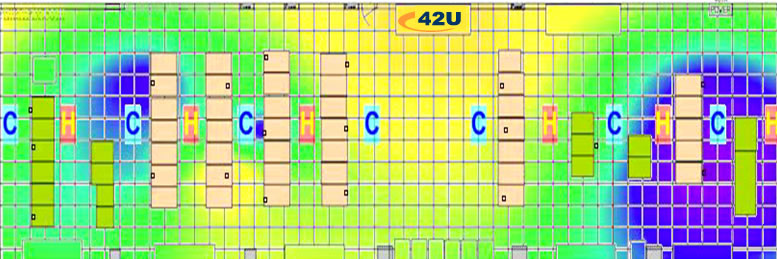
ASHRAE is a global leader in setting data center cooling standards. ASHRAE’s Technical Committee 9.9 (ASHRAE TC 9.9) recommends air entering the servers in the cold aisle to be between 18°C to 27°C (64.4°F to 80.6°F) and a humidity due point of 5.5C to 15C. Our data center managers keep up on the latest recommended ASHRAE Inlet temperature and humidity for our servers, but they can’t know what they can’t measure. Though we can walk though the computer room or down a row of server racks and notice obvious hot spots or blasts of cold air, we cannot easily guess at air temperature or air pressure or if the inlet side of our servers are getting too much or too little air cooling. This too leads to IT professionals over cooling IT equipment to minimize downtime. I will talk more on data center measurement later in this article.
Many corporate executives have limited, if any, comprehension of the “IT magic” that lets their laptop connect to the network or indeed the technology that runs their company seamlessly on a daily basis. Therefore, another data center issue leading to energy inefficiency is management expectations of their IT people. As many of these IT professionals have engineering backgrounds and other technical certifications, they are often expected to be experts in every technical area and discipline. Expecting a Cisco or Microsoft certified engineer to be an expert in HVAC, is the equivalent in medicine of expecting your pediatrician to perform heart surgery or your podiatrist to provide recommendations on lowering your cholesterol.
This exaggerated expectation of IT bandwidth has historically had a very negative impact on data center energy efficiency. When a IT professional doesn’t have sufficient time, training, or expertise in a peripheral technical area, the result is lack of time devoted to proper due diligence and an overreliance on less then objective vendor “facts”. And, unlike the famous scene from “Miracle on 34th Street” when Santa recommends competing Gimbels over Macys, your vendors will seldom intentionally talk themselves out of a sale.
If all you have is a hammer, everything looks like a nail
It is good to keep this famous Bernard Baruch quote in mind when evaluating your cooling / AC strategy. Expecting an AC equipment manufacturer to recommend cooling practices that minimize the need for buying more CRAC units or AC equipment is like walking into a Hummer showroom and expecting the salesperson to recommend the car industry’s latest hybrid SUVs. If you are lucky you might get a helpful technical resource from an AC vendor to talk about hot aisle / cold aisle best practices. And if you are really lucky, you might be able to wrestle some information out of them on the energy efficiency savings of cold aisle containment vs. hot aisle containment. The challenge in this approach is that an energy efficient green data center requires less cooling equipment, thus mitigating the need to buy as much or even any additional chillers or CRAC units from them.

You can’t control or manage what you don’t measure
PUE and DCiE
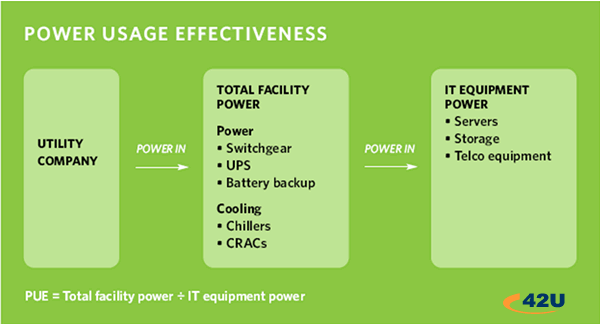
PUE (power usage effectiveness) and its reciprocal DCiE (data center efficiency) are now widely accepted energy measurement standards that were proposed by the Green Grid to help computer room managers determine how energy efficient their data centers are.
*There is a description of PUE/DCiE in layman terms later in the article.
Having a holistic understanding of your computer room or data center’s energy consumption is a key first step in being able to determine the appropriate steps necessary to improve your energy efficiency. Measuring should be used as an ongoing tool in your overall data center strategy. CFD measurement at multiple heights in a row of racks along with air pressure measurement under floor tiles can not only help you insure that you are getting enough cool air to the inlet of your servers, it can help you maintain airflow to the recommended ASHRAE level to all IT equipment. This data can also help you eliminate hot aisle / cold aisle containment issues (hot air leaking into the cold aisles and vice versa). With proper power measurement of your overall data center IT equipment and infrastructure, you will be able to determine your PUE and DCiE. As PUE / DCiE are industry standards, determining your data center’s energy efficiency rating will enable you to compare how efficient your facility is compared with other data centers around the world. It also helps you set a benchmark you can track, report, and continually improve. Keeping your data center energy efficient should be an ongoing process. After determining your facility’s efficiency rating, you implement power and cooling best practices to improve efficiency and then monitor how those changes improved your PUE/DCIE. And as you add additional energy efficient IT assets, the process continues showing how much less energy consumption your facility is using. Improvements in your DCiE and PUE correlate to improved efficiency, which in turn demonstrate a measurable reduction in your company or organization’s power bill.
Why Concentrate on Cooling and Infrastructure for Energy Efficiency
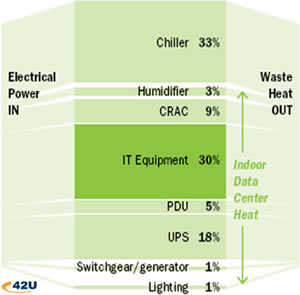
It is important to understand that any Watts saved on power efficient servers, storage systems, and other IT equipment do indeed have a significant cascading impact on the overall power and cooling you need for your data center. An overall efficiency plan should include careful planning on server virtualization and life-cycle costs of all IT assets, but as the chart above demonstrates, 70% of Data Center Energy is consumed by Infrastructure with 45% being the Cooling and environmental equipment used to maintain proper IT equipment temperatures and airflow. A solid data center energy efficiency strategy requires continuous cooling and power measurement and benchmarking.
What is PUE? What is DCiE? … in layman’s terms
Companies and organizations need IT equipment to provide the products and services they offer, handle transactions, provide security, and to run and grow their businesses. The larger a company / organization grows, the greater the need to house their computer equipment in a secure environment. IT equipment includes computer servers, hubs, routers, wiring patch panels, and other network equipment. Depending on size, that secure environment is called a wiring closet, a computer room, a server room, or a data center. In addition to the energy needed to run that IT equipment, electric power is utilized for lights, security, backup power, and to keep the environmental factors in these rooms at temperature and humidity levels that will minimize down time due to heat issues. All IT equipment (and anything run on electricity) generates heat. In a room filled with racks of computers and other IT equipment, a significant amount of your energy costs are incurred by specialized data center cooling and power equipment deployed to keep your servers and other IT equipment up and running. Heat problems in data centers are a leading cause of downtime.
The Good News – Green Data Centers Do Have a Measurable ROI!
 Going green in the data center does indeed have a measurable ROI, can significantly reduce in your organization’s energy costs, and can be achieved with a minimal amount of upfront costs. Before making any sizable investments in energy efficient technologies, like flywheel UPS systems, liquid cooling, in-row cooling, or air-side economizers; measure and benchmark your current environment to determine your current cooling and airflow issues along with benchmarking your DCiE and PUE.
An excellent place to start is looking at power and cooling best practices, which are often relatively easy to implement and relatively inexpensive. Check your hot aisle/cold aisle layout – does all your IT equipment face the same direction or intake air from the same side of the server rack. It sounds obvious but CFD reports from major companies show a surprising amount of equipment being mounted the wrong way. Consider CRAC covers, blanking panels, and sealing cable openings with raised floor grommets. Speak with experts, read up on and consider cold aisle containment and hot aisle containment methods.
Corporations and business leaders are feeling economic pressures as the cost of energy rises. This not only impacts their data center operation costs, but also their plans for supporting new pieces of IT equipment. They, along with public policy makers, also realize that energy consumption as a whole is a critical issue. This, combined with the move towards reduced carbon emissions, has all involved looking for ways to move towards defining the metrics of a “green data center”.
Green data center strategies can meet IT availability and performance requirements while impacting the “bottom line” through the reduction of power/energy needs and a more effective use of existing IT equipment. The result is a more profitable data center that achieves or exceeds many if not all corporate environmental sustainability objectives.