Rose UltraLink Lite Advantages:
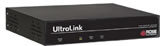
Rose UltraLink Lite sets a new standard for an economical way to remotely manage server room environments. It allows you to access your computers and servers locally or across your network. Connect the unit to a Rose Electronics KVM switch and you now have access to as many as 1,000 computers or servers.
The Rose UltraLink Lite is easy to install and configure. Connect the unit, assign an IP address, install the remote viewer software, and it's ready to use. The sophisticated scaling feature allows you to position any size image of your server's video anywhere on your screen. With this feature, you can monitor servers while working on other tasks in another window. Network workstations can connect to multiple Rose UltraLink Lites and display each connection in separate viewer windows.
The remote client viewer program is designed to simplify accessing the remote computers. Click on the connect icon, login, and you will see a crisp, clear high quality image of the remote computer.Rose UltraLink Lite Typical Application
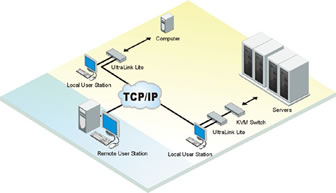
Rose UltraLite Link Diagram
Introduction
The Rose UltraLink Lite is a versatile and powerful product that extends the range of access to your computers and servers to anywhere in the world. Its advanced design makes it compatible with most KVM switches and computers.
Installation
The Rose UltraLink Lite is very easy to install and configure. Just connect the unit to your network, a local KVM station, and a computer or KVM switch. Next, assign an IP address to the unit and you're done. Next, run the remote client viewer program on a network workstation. Enter the assigned IP address and other configuration parameters, save it, and the workstation is ready to access the UltraLink Lite.
Operation
All access to the Rose UltraLink Lite is through the remote client viewer. Drop-down menus provide a selection list of multiple Rose UltraLink locations that can be connected to. Once connected, you will see the computer's video and have complete control over that computer.
Viewer Windowing
The remote client viewer can be adjusted to any size. This feature allows you to place a scaled viewer's image in the corner of your screen and monitor a server while working on other tasks in another window or multiple viewer windows to monitor multiple remote locations.
Security
The Rose UltraLink Lite is designed with the highest regard for security. Remote access requires a user ID and password. All transmissions to and from the viewer and Rose UltraLink Lite are encrypted with the latest SSL technology. Login, time-out, and lock out for repeated attempts to enter the password, add to the security of the system.
Quad Screen Mode
With the Rose UltraLink Lite connected to a KVM switch, you can view four servers at one time. The four connected servers are viewed in real time and are automatically scaled to fit their assigned quadrant in the viewer screen.
Color Modes and Resolution
Full 16-bit color video is supported. You can view the video in black and white, gray scale, color, or use progressive color rendering.
Mouse Cursor
The Rose UltraLink Lite uses a one-mouse cursor system in a very intuitive style to access the remote connection or an application on your desktop.
Video Resolution
Unlike other products, the Rose UltraLink Lite automatically adjusts to the connected computers video. It supports a video resolution up to 1280 x 1024 which allows you to access the standard Sun computers resolutions.
Flash Memory
To support the latest devices and provide continuing features and support, UltraLink Lite contains flash memory.
| Rose UltraLink Lite |
Product Part Number | Description |
| UL-LV3 | Low-cost Single access unit |
RM-UMnn
| Rack mount kit for UL-LV3
(nn = 19", 23", or 24") |
Cable Part Number | Description |
| CAB-CXVSMM005 | 5'UltraLink Lite to KVM switch cable (provided) |
| CAB-CX0606C005 | 5'UltraLink Lite to CPU cable (provided) |
| Rose UltraLink Lite Specifications |
| Dimensions | Model | Width | Depth | Height | Weight |
| | UL-LV3 | 8.90 in | 8.40 in | 1.75 in | 4.10 lb |
| | | 22.6 cm | 21.3 cm | 4.40 cm | 1.86 kg |
| Power Auto Switching | 90 - 240 VAC, 130 watts |
| Connectors | Power: IEC 320 standard receptacle |
| | Local KVM: Video - HD15F
Keyboard - MD6F
Mouse - MD6F
Switch or computer : DB25F
Ethernet port: RJ45
Serial port: DB9M |
| Video bandwidth | 150Mhz |
| Chassis | Electro galvanized steel, black powder coated
(top cover) |
| Controls | Power On / Off Switch |
| Indicators | LEDs: Power, Net, Serial, Local, Ethernet link,
10/100MB Ethernet speed |
| Environmental | 0°- 45°C / 32°- 113°F,
5 - 80% non-condensing RH |
| Approvals | FCC, UL, cUL, TUV, CE, VCCI |