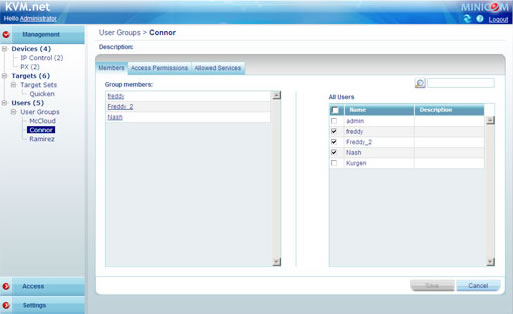
KVM.net II is a centralized management solution for access to servers, Virtual servers, Blade consoles and network devices in the server room and data center environments. It consolidates management of access to servers and network devices, unifying administration of targets and users across geographic locations to distributed branch offices. An Intuitive, browser based GUI simplifies seamless access management, providing complete transparency for users regardless of location and topology.
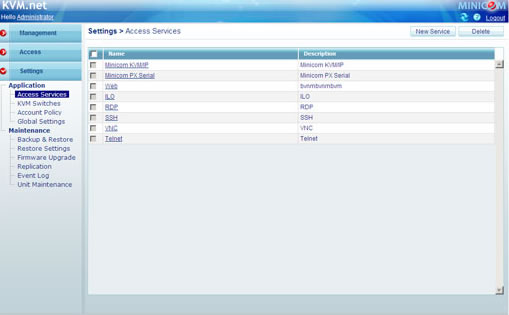
The KVM.net II system includes a KVM.net II Manager appliance, and any number of Minicom KVM IP devices, currently the PX, Smart 116/216/232 IP, SmartRack 116 IP, and IP Control, as well as any number of IT devices such as IP Camera, environmental monitoring, routers etc. In addition to KVM access management, the KVM.net II provides a powerful Access Services feature that supports a wide range of remote access technologies including Serial, RDP, VNC, SSH, Telnet, VMware, HP ILO and Web Services. It enables the assignment of multiple services to a single target device, so you have the option of in-band or out-of-band access to the same device. KVM.net II goes farther still and enables you to effortlessly integrate any new remote access technology into the remote access portal.
Minicom by Tripplite KVM.net II
KVM.net II is a highly secure system with the most stringent IT industry security standards.
- The system is designed to align with existing authentication mechanism (LDAP).
- KVM.net II provides high encryption security to secure the access between
- The user and the KVM.net II Manager.
- The user and the connected KVM IP gateway.
- The KVM.net II Manager and the KVM IP gateways.
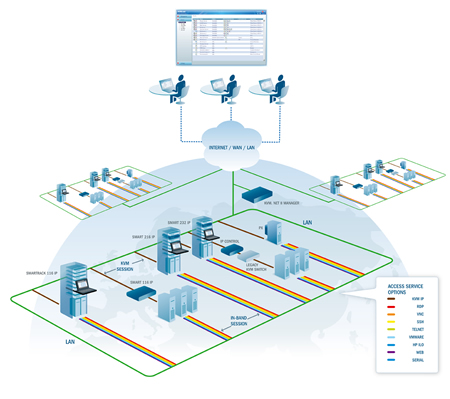
Minicom by Tripplite KVM.net II Diagram
The open, vendor independent system leverages existing installations and legacy systems with smarter management of different server/ data center configurations. It is the only available solution for access and control over mixed server environments of 3rd party switches. KVM.net II aligns with your existing architecture, fully preserving your investment in your current KVM infrastructure. KVM.net II is a fully scalable system that grows with your out-of-band infrastructure. Automatic discovery of all IP devices attached to the system eases installation and maintenance, allowing you to easily add or remove targets and users from the system.
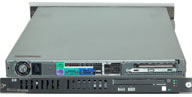
Minicom KVM.net II
PX - Single server IP device
The PX is a compact, cost effective, single server IP device for non-blocking access to servers. The high performance device provides superior video, real-time mouse synchronization, SSL encryption, and full screen mode. Connecting a PX to each of your mission critical servers turns the KVM.net II system into a fully secure, digital, non-blocking matrix solution allowing any number of remote users to control any number of servers, regardless of their physical location and topology. The rack-mountable PX uses Power Over Ethernet technology (POE switch or MidSpan power hub) for efficient, clutter free power management.
Smart IP Access - Remote access to your legacy switches and servers
Smart IP Access provides KVM/IP access to servers and analog KVM switches. It is designed to work with all Minicom and most 3rd party switches. The feature rich device provides superior video, real-time mouse synchronization, SSL encryption, and full screen mode. The Smart IP Access can also be used in stand-alone applications for direct remote KVM access.
KVM.net II Features and Benefits:
- Compatible with major brands of KVM switching systems for remote access to multiple servers. Preserves and maximizes your existing KVM investment.
- Instead of trying to remember how they all work, their IP addresses, user names and passwords, access ALL your servers via a single IP address.
- Eases installation and configuration, bringing KVM IP to be aligned with modern IT management standards.
- Efficient administration according to typical IT practices.
- Upgrades, even for the entire system are no hassle.
- Built-in support for RDP, VNC, SSH, Telnet, ILO and other pre-defined services. You can also create additional custom supports for services such as VMware Server, VMware Infrastructure
- Open architecture allows "recycling" legacy switches
- Resource based User/Server Access
- Elaborate security policy, SSL encryption
- External Authentication system
- Open architecture vendor independent solution. The customer is free to choose any new KVM switches for their IT environment because KVM.net II is able to integrate any 3rd party KVM switch technology via Minicom's IP Control IP gateway.
| Minicom by Tripplite KVM.net II Manager Technical Specifications | |
| Protocols | HTTPS |
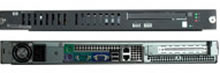
| Form Factor | 1U x 19" Rack Mountable |
| Network Connection | RJ45 |
| Power Supply | 115-230 VAC, 50-60Hz Auto Sensing |
| Operating Temperature | 0to40C / 32 to 104 F |
| Storage Temperature | -20 to 80C / -4 to 176 F |
| Relative Humidity | 5-95%, non-condensing |
| Regulatory/Conformity | FCC, CE, UL |